
Search Docs by Keyword
Lmod software modules
About Modules
On the cluster, we want a variety of apps available, including different versions of the same app and apps that are incompatible. Part of how we accomplish this is by using environment modules. When you first login to the cluster, you are presented with a very basic software environment. One of the ways apps are made available to you or your jobs by loading the modules for them. The modules update shell environment variables so that the system can find and use the apps of your choice. Modules replace the need for separate setup scripts.
Our implementation of environment modules uses Lmod and the bash shell. That page has some excellent documentation for those wishing to learn more about Lmod. In addition to some new features, we have adopted a more systematic naming and versioning convention, and we are more actively curating our app inventory. Below is a condensed version with more FASRC-specific information.
What Software Qualifies for Modules
There is a wide variety of software that users use along with a variety of needs in terms of versioning and build style. To support all of that is intractable. Software modules are those packages that are considered core to cluster operations, which include:
- Compilers (e.g., gcc, intel)
- MPI
- Python
- R
- Commonly Used Math Libraries (e.g. FFTW, GSL, MKL)
- Commonly Used IO Libraries (e.g. HDF5, NetCDF)
- Licensed Software (e.g., Matlab)
FASRC provide these software via modules. Decisions on if a software qualifies to be a module is made at the sole discretion of the FASRC staff. For other libraries that are not in our modules we invite users to look at our Software documentation for other options for installation. Particularly tools like Spack can build a host of different libraries with a variety of options. Containers are also an option for very complicated software stacks or those with Dockerfiles.
How to Use Modules
You can load one or more modules using the module load <module(s) name> command. Examples:
module load matlab/R2025b-fasrc01
module load gcc/15.2.0-fasrc01 openmpi/5.0.8-fasrc01 hdf5/1.14.6-fasrc01
To see what modules you have loaded, run:
module list
To unload a particular module, run:
module unload <module name>
To unload all modules currently loaded, run:
module purge
To save all currently-loaded modules as a collection, run:
module save <collection-name>
To restore a previously-saved collection of modules, run:
module restore <collection-name>
Finding Modules from the command line
For the most robust listing of modules, use module avail, module spider, and module overview.
Module avail
module avail lists all of the modules available at your current level of the hierarchy based on compiler and MPI. Bear in mind that the module avail command does not show all the different modules you could possibly use, but only the ones that you could load in the current environment, given the modules already loaded.
If the avail list is too long consider trying:
module --default avail
Loading a Module May Reveal More Modules
module avail is used here to demonstrate how you can see the change in available modules when loading modules that unlock a dependency and make other modules available — this is Lmod’s hierarchy. When no modules are loaded, module avail lists module in /n/sw/helmod-rocky8/modulefiles/Core:
[jharvard@holylogin08 ~]$ module avail

----------------------- /n/sw/helmod-rocky8/modulefiles/Core -----------------------

... omitted output ...
Suppose you load a gcc compiler module, then this will make available all the apps compiled with that version of the gcc compiler. Note the extra set of modules listed under /n/sw/helmod-rocky8/modulefiles/Comp/gcc/15.2.0-fasrc01:
[jharvard@holylogin08 ~]$ module load gcc/15.2.0-fasrc01
[jharvard@holylogin08 ~]$ module avail

------------- /n/sw/helmod-rocky8/modulefiles/Comp/gcc/15.2.0-fasrc01 --------------
mpich/4.3.1-fasrc01 openmpi/5.0.8-fasrc01
mpich/5.0.0-fasrc01 (D) openmpi/5.0.10-fasrc01 (D)

----------------------- /n/sw/helmod-rocky8/modulefiles/Core -----------------------

... omitted output ...
The modules listed under /n/sw/helmod-rocky8/modulefiles/Comp/gcc/15.2.0-fasrc01 were software compiled with gcc/15.2.0-fasrc01.
Module spider
The module spider <name or partial name> command (example: module spider math) lists details about all available modules that contains the string “math”:
[jharvard@holylogin08 ~]$ module spider math

--------------------------------------------------------------------------------
mathematica:
--------------------------------------------------------------------------------
Description:
Mathematica is a computational software program used in many scientific,
engineering, mathematical and computing fields, based on symbolic
mathematics

Versions:
mathematica/12.1.1-fasrc01
mathematica/13.3.0-fasrc01

--------------------------------------------------------------------------------
For detailed information about a specific "mathematica" package (including how to load the modules) use the module's full name.
Note that names that have a trailing (E) are extensions provided by other modules.
For example:

$ module spider mathematica/13.3.0-fasrc01
--------------------------------------------------------------------------------
Module overview
module overview or ml ov to display the number of modules for each name. For example:
[jharvard@holylogin08 ~]$ module overview

----------------------- /n/sw/helmod-rocky8/modulefiles/Core -----------------------
Anaconda2     (1) cyana       (1) jpeg           (1) pari              (2)
IDL           (2) dmtcp       (2) knime          (3) pycharm-community (1)
Mambaforge    (3) flex        (1) knitro         (2) python            (9)
Miniforge3    (6) gaussian    (4) libpng         (1) rstudio           (5)
QChem         (1) gcc         (6) libtiff        (1) sage              (2)
R             (7) gmp         (2) lumerical-seas (4) sas               (1)
abaqus        (3) gsl         (2) magma          (4) sqlite            (1)
aocc          (1) gurobi-gpu  (1) mathematica    (2) stata             (1)
autoconf      (1) gurobi      (4) matlab         (4) szip              (1)
cmake         (7) intel-mkl   (7) moe            (1) vscode            (7)
comsol-knirck (1) intel       (8) mpc            (4) xplor-nih         (1)
comsol        (4) intelpython (1) mpfr           (4) zlib              (5)
cuda          (7) jasper      (1) ncf            (1)
cudnn         (6) jdk         (6) nvhpc          (2)
Finding modules from Open OnDemand
Note: you must be connected to the FASRC VPN to use Open OnDemand.
You can see all the available modules represented visually through the OOD Dashboard using your web browser.
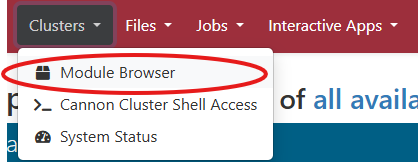
Log in to Cannon OOD or FASSE OOD and navigate through the top menu to Clusters -> Module Browser
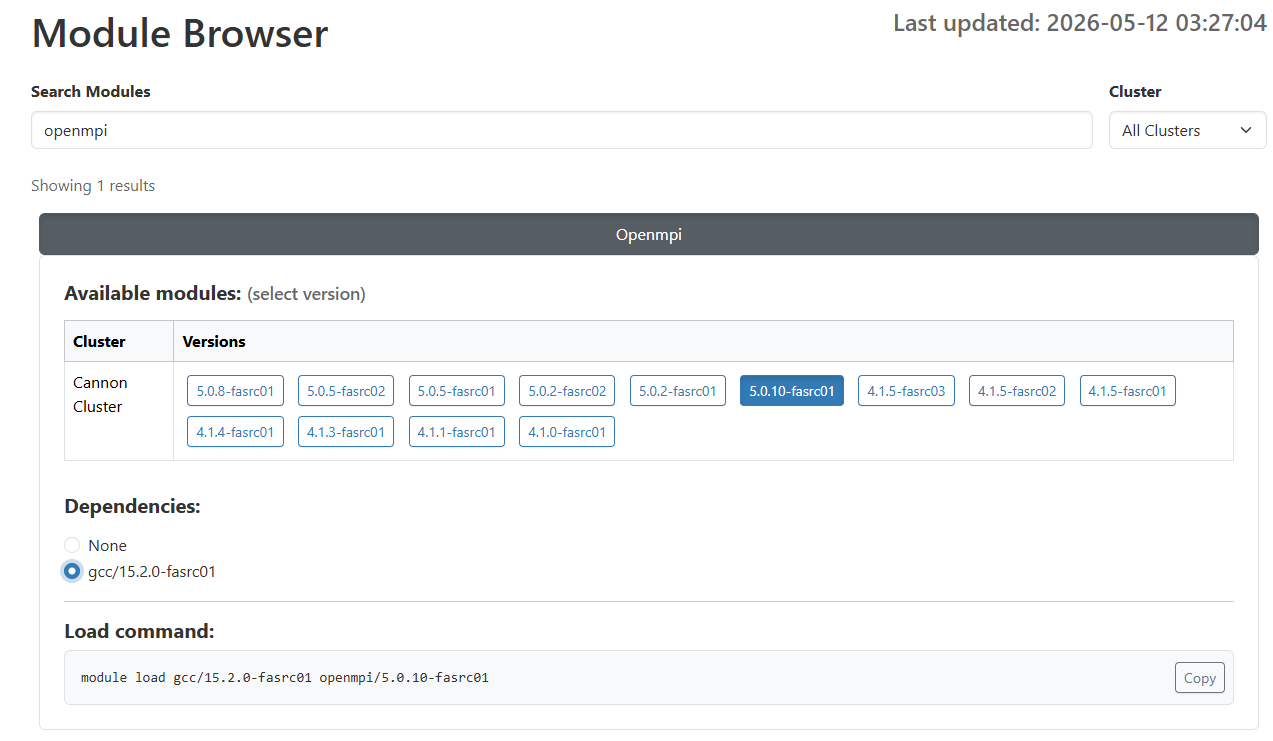
Click the name of a module to display details. Or, you can type the module name to search, for example, search for openmpi. All openmpi versions are displayed. When you click on the on a specific version, the dependencies are displayed.
Module Naming and Versioning
You can load specific versions by supplying the full module name. Example:
module load matlab/R2025b-fasrc01
Or let the module system automatically load the latest version, for example:
module load matlab
The default is determined either according to alphanumeric sorting or in some cases the version we have chosen to be the default latest version based on stability or commonality.
It is strongly recommended to load modules specifying name and specific version. This way you are protected in case the default version changes.
Version Changes When Loading Dependencies.
If module A requires module B, and you already have some version of B loaded, A will usually consider the dependency satisfied, rather than force a specific different (often older) version of B to be loaded. This has the potential to cause issues if a specific version is required. Be sure to look at the module’s requirements before assuming this will work. Or, at the very least, test your script before trusting that it will work.
More about software
You can find out more about modules and software on the following pages: